> For the complete documentation index, see [llms.txt](https://docs.minterest.com/taiko-morph-guide/llms.txt). Markdown versions of documentation pages are available by appending `.md` to page URLs; this page is available as [Markdown](https://docs.minterest.com/taiko-morph-guide/repaying-loans.md).
# Repaying Loans
This guide focuses on working directly with contracts on Taiko or Morph via network-specific block explorers, not via the Minterest UI.
#### Repaying Outstanding Loan Amounts
{% hint style="info" %}
Repay operations require granting an approval for the market to spend tokens on your behalf before triggering the repay. You'll execute two transactions: a spending approval and a repay confirmation.
{% endhint %}
> For these next steps, we'll be interacting with **Taiko**'s & **Morph**'s explorer using both $**USDC**'s market or token address:
* **Market address on Taiko**:\
**`0xF89B01fa87a3E51BDA2dA67154Ea35A3F84eC373`**
* **Token address**:\
**`0x07d83526730c7438048D55A4fc0b850e2aaB6f0b`**
* **Market address on Morph**:\
**`0x793ce6AC5112DA5Db9C046848af99C749e14b1A4`**
* **Token address**:\
**`0xe34c91815d7fc18A9e2148bcD4241d0a5848b693`**
{% hint style="info" %}
Before triggering the repay, make sure you have enough tokens in your wallet to cover the outstanding loan plus accrued interest.
{% endhint %}
***
#### Providing an Approval
1. Locate the contract address for **the token** associated with your desired market in the smart contracts list provided in this guide.
2. Visit [Taiko](https://taikoscan.io)'s or [Morph](https://explorer.morphl2.io)'s blockchain explorer and input **the token contract address** chosen on the page's search field:
3. Go to the **Contract** section, open the **Write as Proxy** or **Write proxy** tab, then click **Connect to Web3** or **Connect wallet**:
4. Select the blockchain wallet you're using — after that, your wallet will display a browser pop-up asking you to connect to Taiko's or Morph's explorer.
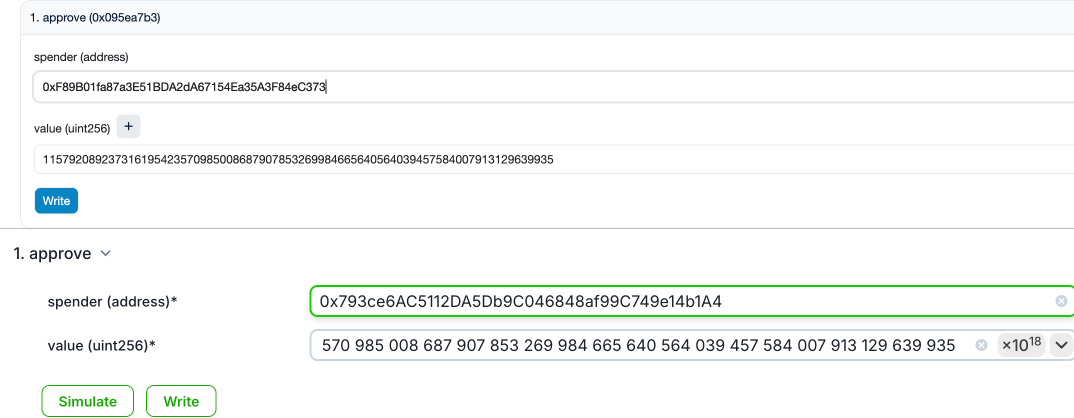
5. Once connected, scroll down and choose the `approve` function.
6. Paste **the market contract address** of the market associated with your desired token into the `spender` input field.
7. To ensure the entire borrow amount is repaid, it's recommended to enter the following string in the `value (uint256)` input field:\
\
**`115792089237316195423570985008687907853269984665640564039457584007913129639935`**
\
This is the maximum value for `value (uint256)` and ensures the market can pull the correct amount considering newly accrued interest, guaranteeing the loan is fully repaid:
8. Click **Write**, then approve the transaction in the browser pop-up displayed by your wallet.
***
#### Executing the Repay
1. Locate the contract address for **the market** associated with your desired market in the smart contracts list provided in this guide.
2. Visit [Taiko](https://taikoscan.io)'s or [Morph](https://explorer.morphl2.io)'s blockchain explorer and input **the market contract address** chosen on the page's search field:
3. Go to the **Contract** section, open the **Write as Proxy** or **Write proxy** tab, then click **Connect to Web3** or **Connect wallet**:
4. Locate and choose the `repayBorrow` function, then enter the following string in the `repayAmount (uint256)` input field:\
**`115792089237316195423570985008687907853269984665640564039457584007913129639935`**
5. Click **Write**, then approve the transaction in the browser pop-up displayed by your wallet.
6. After repaying your loan, it's recommended to remove the approval from the market contract by using the same flow but setting the `value (uint256)` input field to zero: **`0`**
{% hint style="info" %}
You cannot repay unless you've already borrowed this asset beforehand and your wallet has enough balance to cover the inputted amount.
{% endhint %}